Download and Run the Script
Download the wireguard-install script:
wget https://raw.githubusercontent.com/Nyr/wireguard-install/master/wireguard-install.sh -O wireguard-install.shAdvertisements
After downloading the script, make it executable:
chmod +x wireguard-install.shNow run the script as root:
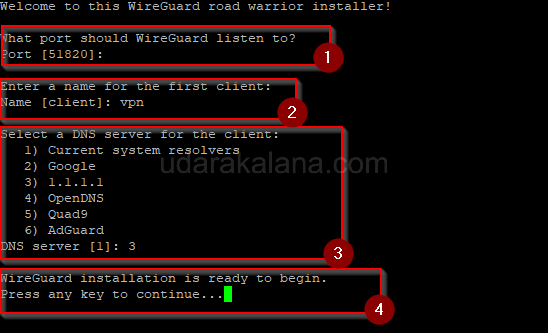
sudo ./wireguard-install.shThe script will ask you a few questions to configure your WireGuard VPN server. It will also install the necessary packages and dependencies.
Connect to the VPN Server
Once the installation is complete, the script will generate a client configuration file for you. The client configuration file contains all the necessary information for a client to connect to the VPN server. The configuration file will be located in the /root directory with the name that you entered in the step 1 name.conf
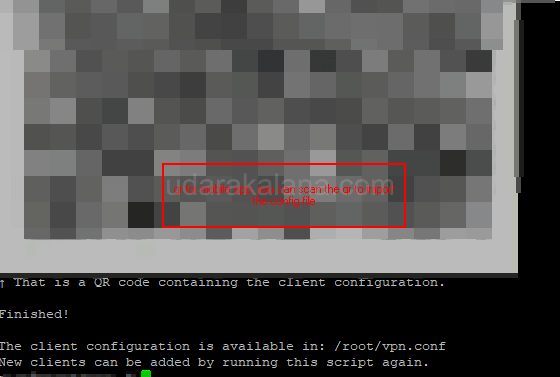
To connect to the VPN server from a client machine, you’ll need to install the WireGuard client. The WireGuard client is available for most operating systems, including Windows, macOS, iOS, and Android.
https://www.wireguard.com/install/
Advertisements
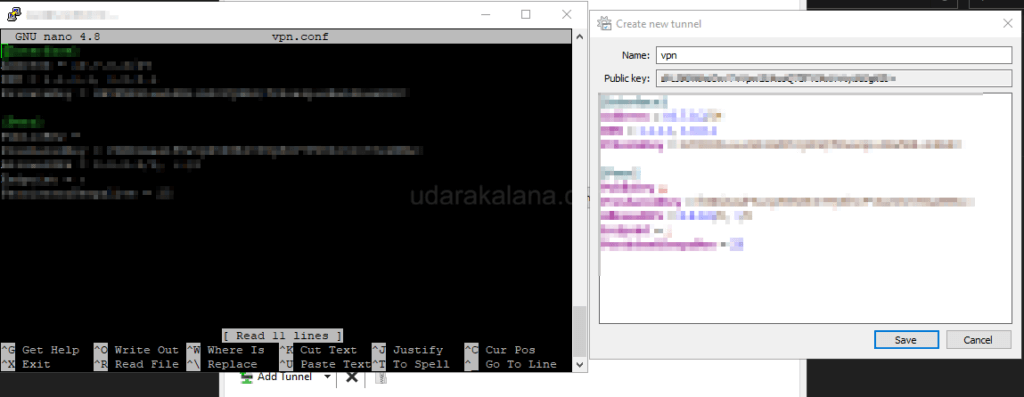
Once you’ve installed the WireGuard client, you can import the client configuration file generated in Step 1 (to get the name.conf use FTP or nano ). The vpn client will then connect to the VPN server.
Special thanks goes to Nyr for developing the wireguard-install script. You can find more information about the script on the Github repository.